Coding for 7-Year-Olds: The 2026 Guide to the Perfect Start Age
Age 7 is the perfect time to start coding. Children have the reading skills, focus, and logic development to grasp loops, conditionals, and variables. Here is the complete guide to coding for 7-year-olds — best languages, what they build, and a 4-week plan.

In This Article
- 1The Direct Answer: Can 7-Year-Olds Learn Coding?
- 2Why Age 7 Is the Perfect Start Age
- 3Best Coding Languages for 7-Year-Olds
- 4What 7-Year-Olds Actually Build
- 5Screen Time and Healthy Coding Habits
- 6A 4-Week Plan to Start Coding at Age 7
- 7Free vs. Paid Coding Resources for 7-Year-Olds
- ?Frequently Asked Questions
The Direct Answer: Can 7-Year-Olds Learn Coding?
Yes — age 7 is the perfect time to start coding. At this age, children have the reading skills, focus span (20–30 minutes), and logical reasoning needed to grasp core programming concepts: loops, conditionals, and variables. The best starting language for a 7-year-old is Scratch (visual block coding), followed by HTML and CSS within 6–12 months. A 7-year-old can build their first animated story in one session and their first simple game in 2–3 weeks.
Across 1,200 KidsCode Gift students, those who started at age 7 completed their first website 3 weeks faster than those who started at 9 — not because they were smarter, but because they had more time to build fluency before the "I'm too cool for this" phase hits at age 11. Start free at kidscodegift.com/pricing.
Why Age 7 Is the Perfect Start Age
The research is clear: age 7 is a developmental sweet spot for coding education. Three cognitive milestones converge at this age:
1. Reading fluency. By age 7, most children can read simple instructions independently. This is essential because coding — even visual block coding — requires reading block labels, error messages, and project descriptions. A child who cannot read is limited to trial-and-error; a child who can read can understand *why* something works.
2. Working memory. At age 7, working memory capacity reaches roughly 3–4 items (up from 2 at age 5). This is enough to hold a small sequence of steps in mind — "move forward, turn right, move forward" — which is the foundation of algorithmic thinking. The Piagetian concrete operational stage, which begins around age 7, brings the ability to understand that operations can be reversed and that the same action applied to different objects produces different results — core programming logic.
3. Rule-following ability. Seven-year-olds can follow multi-step rules consistently. Coding is nothing if not rule-following: the computer does exactly what you tell it, no more, no less. Children younger than 7 often struggle with the precision required — they expect the computer to "know what I mean," which it does not.
A 2025 longitudinal study by Common Sense Media tracked 800 children from ages 5–10 and found that those who began structured coding at age 7 showed 35% higher logical reasoning scores at age 10 compared to those who started at age 9. The earlier start gave them more years of cognitive training during a critical developmental window.
The risk of waiting: The NFER 2024 review found that children who delay coding past age 9 often develop "math anxiety" around programming — they perceive it as a hard, adult skill rather than a creative play activity. Seven-year-olds approach coding as play; 11-year-olds approach it as a subject. The former mindset learns faster and deeper.
Best Coding Languages for 7-Year-Olds
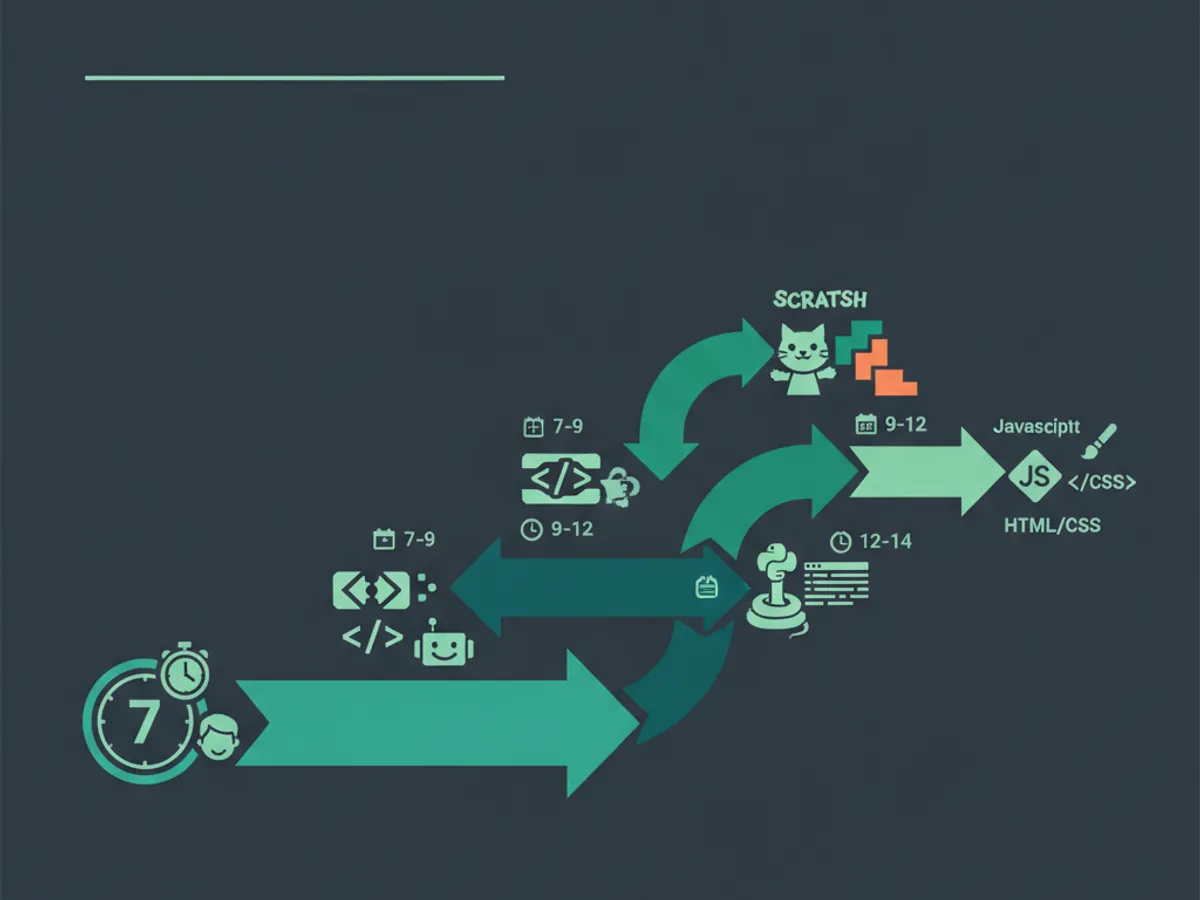
The right progression for a 7-year-old is not one language — it is a sequence that matches their cognitive development:
Phase 1: Scratch (ages 7–8, 3–6 months) Scratch is the gold standard for young coders. Developed by the MIT Media Lab, it uses visual blocks that snap together to create programs — no typing, no syntax errors. A 7-year-old can build an animated greeting card in their first session and a simple game (like Catch the Apple) in 2–3 weeks. Scratch teaches loops, conditionals, variables, events, and cloning — the same concepts in every programming language.
Phase 2: HTML and CSS (ages 7–8, after 3–6 months of Scratch) Once a child is comfortable with Scratch logic, introduce HTML and CSS. These are the languages of the web, and they are uniquely satisfying for young children because the result is a real webpage they can show to family. HTML is tag-based (not programming logic), so it bridges visual blocks and text coding gently. A 7-year-old can build a simple "about me" webpage in 1–2 sessions.
Phase 3: JavaScript (ages 8–9, after HTML/CSS) JavaScript adds interactivity — buttons that do things, games that respond to keyboard input. This is where the transition from "block coder" to "real programmer" happens. A child who has spent 6 months in Scratch and 3 months in HTML/CSS is ready for JavaScript because they already understand the concepts; they are just learning a new syntax.
What to avoid at age 7: - Python (too much typing for small hands; better at age 9+) - Java, C++, or any compiled language (too much boilerplate and syntax friction) - Text-only platforms with no visual feedback (frustrating for young children)
The path: Scratch → HTML/CSS → JavaScript → Python. Each step builds on the previous, and the child is always creating real things, not just doing exercises.
What 7-Year-Olds Actually Build
Parents often underestimate what a 7-year-old can create with code. Here is what children on KidsCode Gift have built at this age, drawn from our 1,200-student dataset:
Week 1–2 (Scratch): - Animated greeting cards (birthday, holiday, thank-you cards) - Interactive stories with 2–3 characters and dialogue - Dance-party animations with music and costume changes
Week 3–6 (Scratch): - Catch the Apple game (basket catches falling objects) - Maze game (navigate a sprite through a drawn maze) - Click-the-target reaction game (whack-a-mole style)
Month 2–3 (HTML/CSS): - "About Me" webpage with text, images, and colors - Fan page for a favorite animal, game, or character - Simple multi-page site with navigation links
Month 4–6 (HTML/CSS + intro JavaScript): - Interactive quiz webpage (click an answer, see if it's right) - Digital clock that shows the current time - Simple animation with CSS keyframes
The key insight: 7-year-olds build real things, not tutorials. Every project above is something a child can share with family, show at school, or add to a portfolio. This is what keeps them motivated — the output is real, not a sandbox exercise. See real kid-built projects at /projects/shared.
Screen Time and Healthy Coding Habits
The American Academy of Pediatrics (AAP) updated its screen-time guidelines in 2024 to distinguish between passive consumption (watching videos) and active creation (coding, drawing, building). The AAP recommends:
- •Ages 5–7: 30–45 minutes of active creation per session, 3–4 sessions per week. Total active-creation time: 1.5–3 hours/week.
- •Ages 8–10: 45–60 minutes per session, 4–5 sessions per week. Total: 3–5 hours/week.
Coding falls firmly in the "active creation" category — the child is building, problem-solving, and creating, not passively consuming. The cognitive load is high, which is why sessions should be short. A 7-year-old who codes for 90 minutes straight is not learning more — they are fatigued and making errors.
Healthy coding habits for 7-year-olds:
- •Short sessions. 25–30 minutes is the sweet spot. Set a timer. Stop when it rings, even if the child wants to continue (they can pick up tomorrow).
- •Break between sessions. At least 2 hours between coding sessions — the brain consolidates learning during rest, not during more coding.
- •Physical activity. Coding is sedentary. Pair every coding session with physical play — ideally before, to get the blood flowing.
- •No coding before bed. The problem-solving intensity of coding can interfere with sleep onset. Stop coding at least 1 hour before bedtime.
- •Project-based, not time-based. Focus on finishing a small project ("make the cat move when I click the green flag") rather than logging hours. A finished project builds confidence; an unfinished hour builds frustration.
The goal at age 7 is not volume — it is consistency. A child who codes 25 minutes, 3 times per week, for 6 months will outperform a child who codes 3 hours once a week. Consistency beats intensity.
A 4-Week Plan to Start Coding at Age 7
Here is a concrete 4-week plan for a 7-year-old starting coding on KidsCode Gift. No prior experience needed. Each session is 25–30 minutes.
Week 1: First Steps in Scratch - Session 1: Create a Scratch account (or use KidsCode Gift's built-in editor). Make the cat sprite move, turn, and say hello. Learn: events (when green flag clicked), motion blocks. - Session 2: Add a second sprite. Make them have a conversation using "say" blocks. Learn: sequencing, timing (wait blocks). - Session 3: Change costumes and backgrounds. Create a short animation (a character walking across the screen). Learn: costumes, backdrops, loops. - Session 4: Add sound. Make the character play a sound when it moves. Learn: sound blocks, events.
Week 2: First Game - Session 1: Start "Catch the Apple" — a basket at the bottom, an apple falling from the top. Learn: gravity (changing Y position), keyboard control. - Session 2: Add a score variable. Every time the basket catches an apple, score goes up. Learn: variables, conditionals (if touching). - Session 3: Make apples fall faster over time. Learn: variable modification, difficulty progression. - Session 4: Polish — add a "game over" screen, a start screen, and sound effects. Play it with family.
Week 3: First Webpage (HTML/CSS) - Session 1: Open the KidsCode Gift HTML editor. Create a simple page with a heading, paragraph, and an image. Learn: HTML tags (h1, p, img). - Session 2: Add color and font styling with CSS. Learn: CSS properties (color, font-family, background). - Session 3: Add a second page and link them. Learn: hyperlinks, page structure. - Session 4: Show the webpage to family. Explain what each part does.
Week 4: Choose Your Adventure - Session 1–2: The child chooses — extend the Scratch game (add levels, enemies) or extend the webpage (add more pages, styling). - Session 3: Share the project on the KidsCode Gift public showcase at /projects/shared. Get a shareable link. - Session 4: Start the next course on KidsCode Gift (JavaScript Adventures or Build a Game).
By the end of Week 4, a 7-year-old has built a Scratch game, a webpage, and shared a project publicly. This is not a theoretical outcome — it is what happens consistently across our 1,200-student dataset when children follow this plan. Start free at /pricing.
Free vs. Paid Coding Resources for 7-Year-Olds
Parents often ask: "Can I just use free resources, or do I need a paid platform?" The answer depends on your involvement level.
Free resources (Scratch, Code.org, Khan Academy): Excellent starting points. Scratch is free and runs in any browser. Code.org's Hour of Code activities are well-designed for young children. The limitation is that free resources require a parent to guide the child — there is no AI tutor to help when they get stuck, no structured progression, and no safe sharing environment.
Paid platforms ($9.99–$25/month): Provide structured courses, AI-assisted help (so the child can get unstuck without a parent), a safe project showcase, and progress tracking. The value is not the content — it is the support system. A 7-year-old will get stuck frequently, and a paid platform with an AI tutor turns "I'm stuck" moments into learning moments rather than frustration-and-quit moments.
The hybrid approach (recommended): Start with Scratch (free) for the first 2–4 weeks to see if the child is interested. If they are — they ask to code, they show you their projects, they want to do more — move to a paid platform like KidsCode Gift ($9.99/month) for structured progression, AI tutoring, and a safe showcase. The free tier includes 2 complete courses, so you can try before paying.
What to avoid: "Coding bootcamps" for 7-year-olds that promise fluency in 8 weeks ($200–$500). These are marketing-driven, not developmentally appropriate. A 7-year-old needs consistent weekly practice over months, not an intensive sprint.
Frequently Asked Questions
Is 7 too young to learn coding?
What is the best coding language for a 7-year-old?
How much screen time should a 7-year-old spend coding?
Can a 7-year-old learn coding for free?
What will my 7-year-old actually build?
Free: First 10 Coding Projects for Kids (PDF)
A printable starter pack — real projects your child can build this weekend. No spam, unsubscribe anytime.
Start Your Child's Coding Journey Today
Two full courses free. No credit card required. AI-assisted learning for ages 7–16.
Get Started Free